If you manage compliance for a General Contractor in Ontario, you probably have a routine:
- Paste 50 subcontractor account numbers into the WSIB eClearance tool.
- Click “Select All”.
- Click “Save as PDF”.
- File the document and move on.
It feels efficient. It looks compliant. But it is dangerous.
We have identified a critical “blindspot” in the WSIB’s bulk export feature that could leave you liable for uninsured subcontractors, even if your PDF says they are clear.
The “Silent” Red Flag#
When you perform a bulk search, the WSIB tool generates a list showing the “Validity Period” for each subcontractor. It looks like this:
ABC Roofing Inc. | Valid: 20-Aug-2025 to 19-Feb-2026
If you download the PDF or Spreadsheet, this is the only data you see. You see a future expiry date, so you assume the subcontractor is in good standing.
The Proof (Screenshot)#
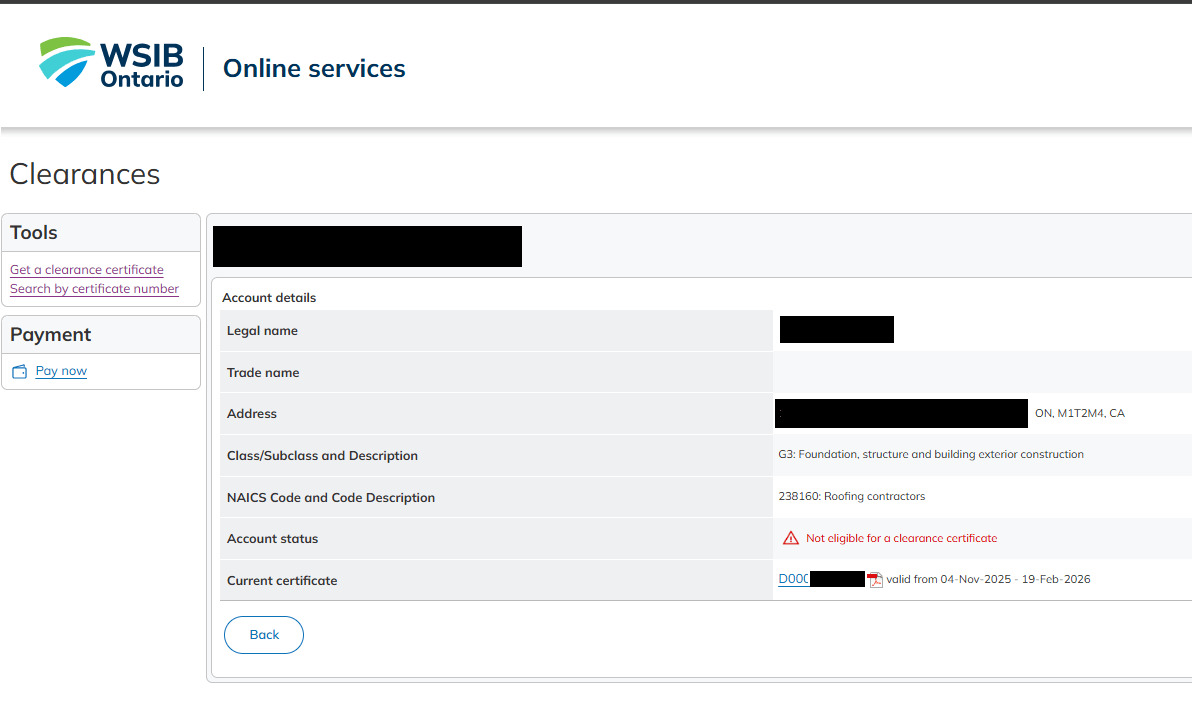
This is what the PDF hides. Below is a screenshot of a subcontractor who has a “Valid” certificate in the bulk list, but is actually Ineligible when you check their live status.
Watch the Flaw in Action (Video)#
Don’t believe a PDF could be this misleading? Watch this screen recording.
We search for two companies. Both show up in the search results with valid “Green” certificate dates. But when we click through, one of them is actually ineligible.
The “Click-Through” Problem#
The public WSIB tool is designed to generate certificates, not to act as a real-time compliance dashboard. To be 100% sure a subcontractor is safe, you cannot just print the list. You must click on every single link to verify the Account Status on the detail page.
If you have 50 subcontractors, that is 50 clicks, every single month. If you skip this step and rely on the bulk PDF, you are flying blind.
The Legal Consequence: Strict Statutory Liability#
You might think, “But I have a PDF that says valid!”
Many GCs misunderstand how liability flows in Ontario construction. Under the Workplace Safety and Insurance Act, construction has its own strict liability code. If your subcontractor loses their good standing and defaults on their payments, you become legally liable for their debt.
Furthermore, the law makes it an offense to permit construction work during any period where you are aware a clearance certificate is not in effect.
This means you are not just facing a slap on the wrist. You are liable for:
- The subcontractor’s unpaid premiums.
- The cost of any injuries that occur on your site.
- Prosecution for the provincial offence of permitting work while “aware that no clearance is in effect.”
If you rely on a bulk PDF export that hides the “Ineligible” status, that PDF snapshot may not protect you.
The Automated Solution#
You cannot manually click through hundreds of links every month. That is why we built RosterSure.
RosterSure goes beyond simply reading dates. Our Compliance Automation Engine:
- Monitors Live Account Status: We verify the real-time eligibility of every subcontractor. Active projects are audited every 3 days, while inactive ones are refreshed every 30 days to ensure your records never go stale.
- Overrides the “Paper” Dates: A certificate might look valid on paper, but if the WSIB flags an account as Ineligible, RosterSure prioritizes the truth.
- Instant Visual Alerts: Your dashboard turns RED the moment a status changes, ensuring you see the red flag long before a subcontractor sets foot on your site.
Don’t let a PDF hide the truth. Start your free trial and let RosterSure uncover the hidden risks on your job site today.